Integration
Send signed form events to your own endpoint
Send each new form submission as JSON to a public HTTPS endpoint. Choose the fields, sign requests, and inspect delivery results from the form’s Integrate tab.
Connect a form webhook
- 01
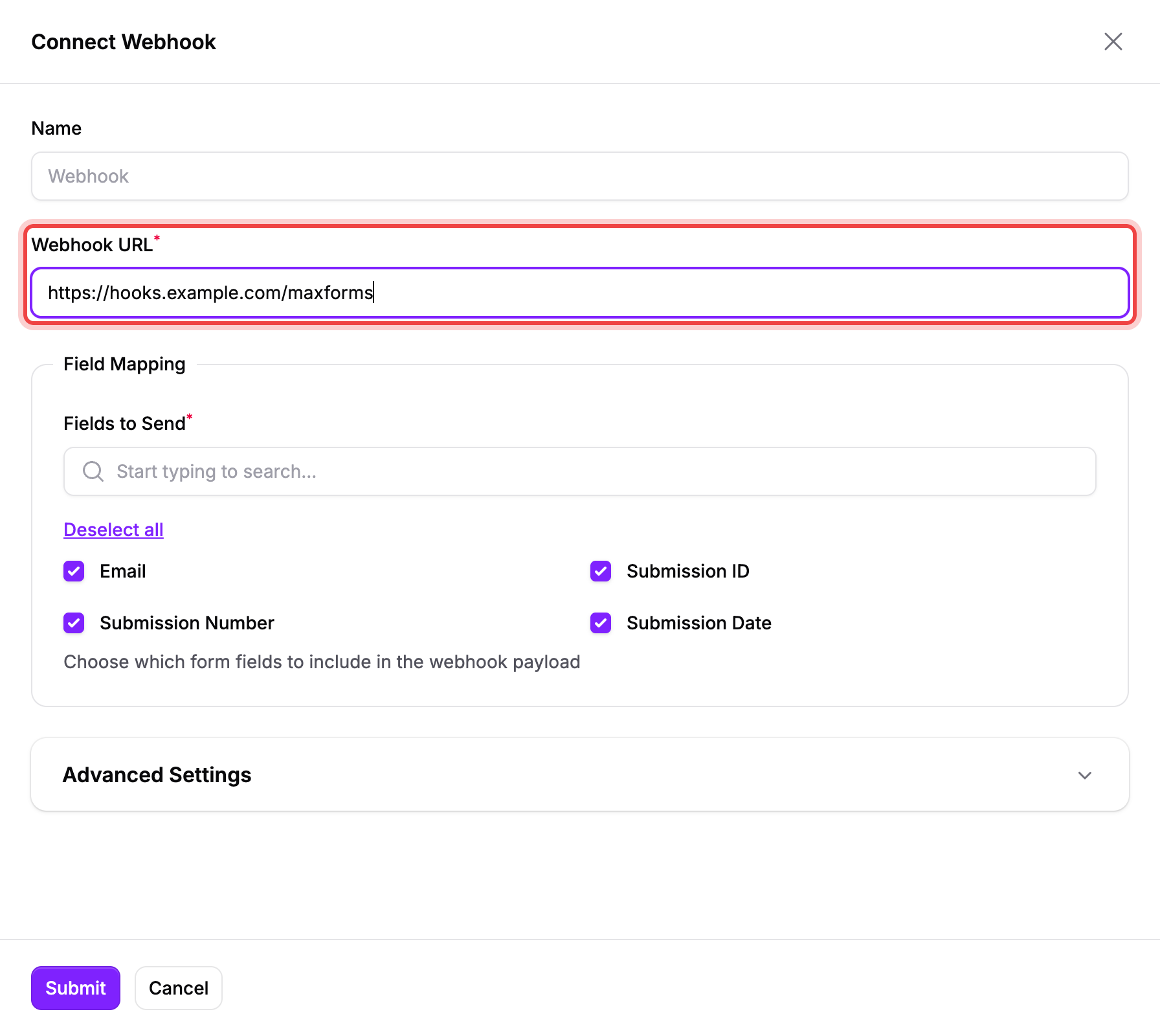
Enter Webhook URL
Open the form’s Integrate tab, find Webhook, and select Connect. Use the final public HTTPS URL for your receiver.
- 02
Send Test
Use Send Test to check whether the endpoint accepts a request. Confirm the response status and inspect the payload on your server.
- 03
Choose Fields to Send
Select the answers and submission metadata the receiver needs. Omit fields that your downstream workflow does not use.
- 04
Keep Sign Requests enabled
Under Advanced Settings, keep Sign Requests enabled and store the Webhook Secret securely on your server.
- 05
Save and confirm delivery
Select Submit, send a new form response, then open the clock icon to inspect the Webhook events log.
What is in the submission payload?
The JSON object identifies the event as submission.created. It contains form details and selected submission answers.
data.form.fields maps field codes to question labels. data.submission.fields maps those same codes to values. Unanswered included fields have null values.
Read the form webhook setup guide for a captured payload and the current settings.
Form webhooks and API webhooks use different contracts
| Connection | Payload | Signature headers |
|---|---|---|
| Webhook on a form’s Integrate tab | Submission JSON with data.form and data.submission | webhook-id, webhook-timestamp, webhook-signature |
| Webhook subscription through the API | JSON:API event with an included submission | X-Maxforms-Signature and X-Maxforms-Delivery |
Verify requests before processing answers
For the form integration, validate the Standard Webhooks signature against the raw request body. Reject invalid or stale requests before processing the submission.
Use the working Node.js verification example. API clients should follow the separate API webhook contract.
Handle retries and failed deliveries
The form webhook retries connection failures, 408, 429, and server errors. Other client errors stop that delivery; a 410 response pauses the integration.
Return a successful 2xx status promptly after safely accepting the event. Make downstream processing idempotent so retries do not duplicate business actions.
Inspect the events log when delivery fails. Your form responses remain in Maxforms, but failed deliveries are not automatically replayed after you repair the connection.
See the webhook configuration screen
Questions
Frequently asked questions
01Can Maxforms send webhooks to localhost?
No. Use a publicly reachable HTTPS endpoint. Localhost and private network addresses are rejected.
02Which HTTP methods can I use?
The form Webhook integration supports POST, PUT, and PATCH. Configure the method under Advanced Settings.
03Do form webhooks use the API webhook signature header?
No. Form webhooks use webhook-id, webhook-timestamp, and webhook-signature. API subscriptions use X-Maxforms-Signature and have a different payload contract.
Start free
Ready to build smarter online forms?
Create secure online forms, automate submissions, collect payments, and launch faster with Maxforms, the powerful alternative to Jotform.