The Webhook integration on a form's Integrate tab posts each new submission to a URL you choose, with an optional signature so your server can verify it came from Maxforms. It is the right tool when Zapier is not; developers building on the API should use API webhooks instead.
Connect a webhook#
- Open your form and select the Integrate tab.
- Under Discover Integrations, find Webhook and select Connect.
- Enter the endpoint that should receive submissions under Webhook URL. Give the integration a Name too if you plan to connect more than one webhook to this form.
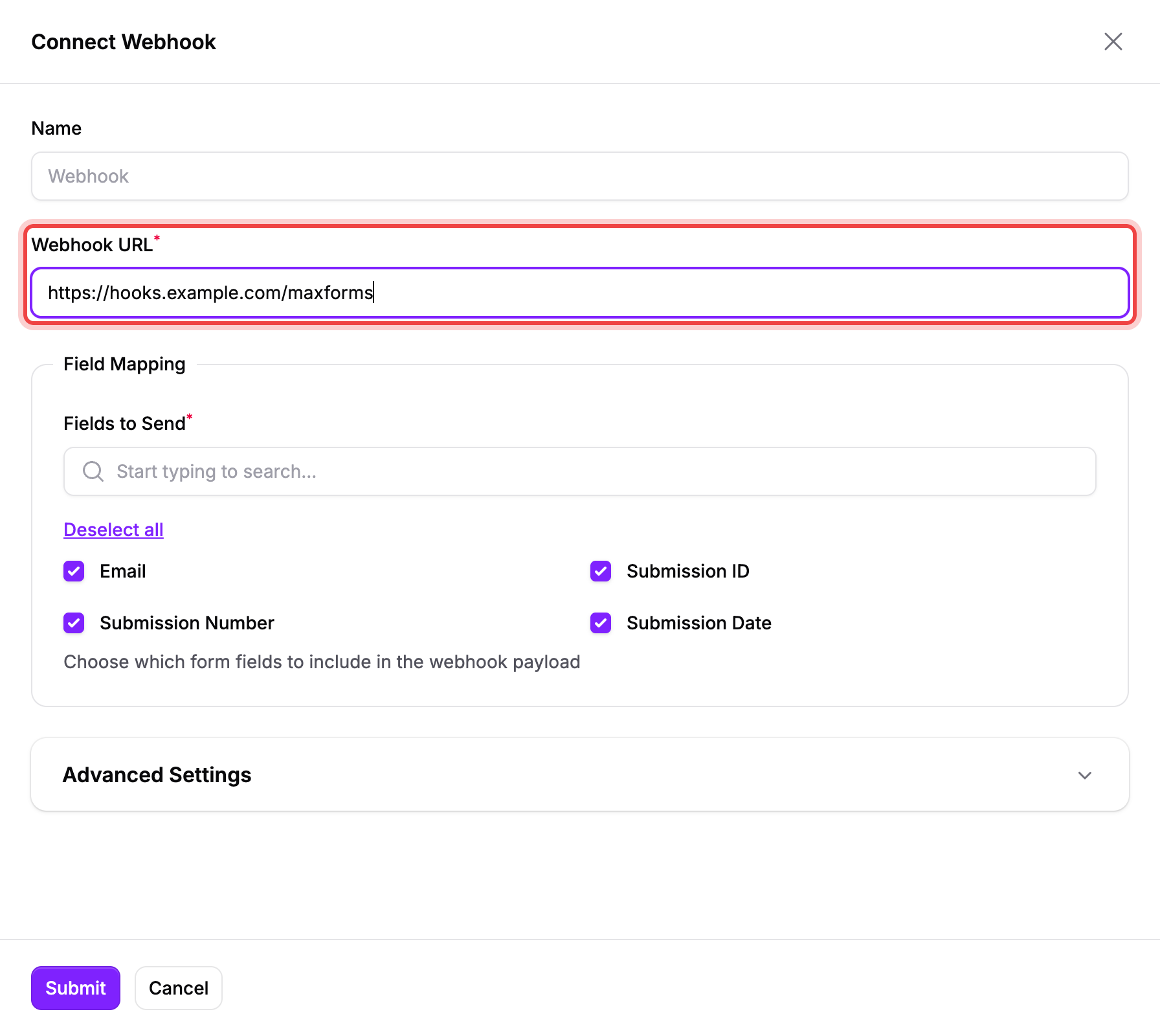
- Select Send Test to confirm your endpoint receives the request before you rely on it. A passing test shows Test passed with the response's HTTP status; a failing one shows Test failed with the reason.
- Under Fields to Send, choose which answers to include. Every field is ticked by default, along with Submission ID, Submission Number, and Submission Date.
- Expand Advanced Settings if you need to change the HTTP Method (POST, PUT, or PATCH), turn off Sign Requests, replace the Webhook Secret, or turn off Verify SSL for an endpoint with a self-signed certificate. Maxforms generates the Webhook Secret for you; select the eye icon on the field to reveal it.
- Select Submit.
What the payload looks like#
Every delivery is a JSON object. Here is a real one, captured from a Send Test call on a form with one Email field:
{
  "type": "submission.created",
  "timestamp": "2026-09-07T01:06:58+00:00",
  "data": {
    "form": {
      "id": "KRRxygQJqr37",
      "name": "C7 Webhook Docs Temp",
      "key": "KRRxygQJqr37",
      "fields": {
        "01M1WPDPT702C8YWT195N5ZTMY": "Email"
      }
    },
    "submission": {
      "fields": {
        "01M1WPDPT702C8YWT195N5ZTMY": "[email protected]"
      },
      "id": "test_5cd648968031af",
      "number": 1,
      "submitted_at": "2026-09-07T01:06:58+00:00"
    }
  }
}
data.form.fields maps each field's code to its label, and data.submission.fields maps the same codes to the respondent's answers, so you can look up which value belongs to which question. A question the respondent left blank still appears in the map with a null value, so the set of keys is the same on every delivery.
Verify the signature#
With Sign Requests on, every request carries three headers: webhook-id, webhook-timestamp, and webhook-signature. A real example:
webhook-id: msg_01M1WPEWZM8FJ8E065T9Z8TMK0
webhook-timestamp: 1788743218
webhook-signature: v1,w66jo7tjbuN/4SsaCGZtvowX6vGTfDecuU5BiDnunlQ=
To check a request came from Maxforms:
- Build the string
{webhook-id}.{webhook-timestamp}.{raw request body}. - Compute an HMAC-SHA256 of that string using your Webhook Secret (reveal it with the eye icon under Advanced Settings if Maxforms generated it for you; if the secret starts with
whsec_, base64-decode the part after the prefix first). - Base64-encode the result and compare it, using a constant-time comparison, to the part of webhook-signature after
v1,.
This follows the Standard Webhooks specification, so an existing Standard Webhooks verification library works too.
Read the Events log#
- On the form's Integrate tab, select the clock icon on the Webhook row to open its events log.
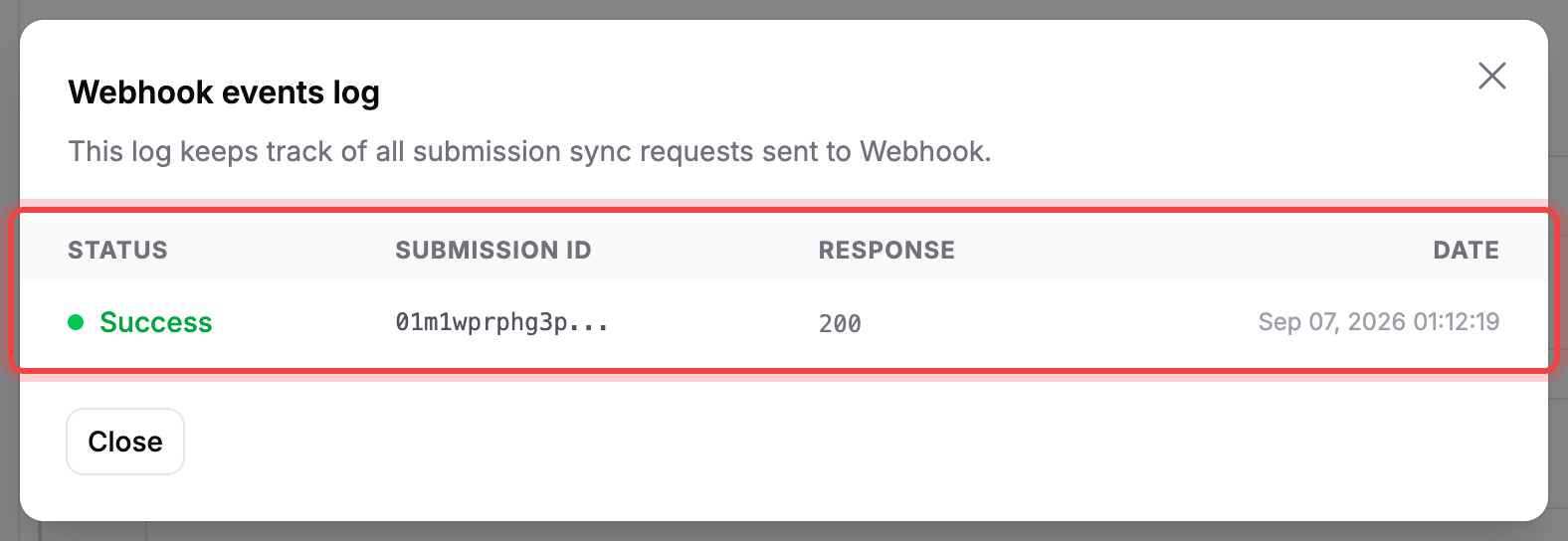
Each row shows one delivery attempt with its status, submission ID, response, and date:
- Success: your endpoint returned a 2xx response.
- Failed: the delivery ended without a 2xx response and Maxforms won't try it again, either because the error wasn't one it retries or because it ran out of attempts.
- Retrying: Maxforms is trying again. Only a server error (5xx), a 429, a 408, or a connection failure gets retried, up to 8 attempts spread over roughly 27 hours. Any other error code, such as 401, 403, 404, or 422, ends the delivery after a single attempt.
If deliveries fail, then check the URL, the certificate and your response code#
- If the test says the URL is blocked or resolves to a private address, point Webhook URL at a publicly reachable endpoint; Maxforms can't deliver to
localhostor an address on your private network. - If it says the URL must use HTTPS, use an
https://endpoint; Maxforms won't post to plain HTTP. - If your endpoint uses a self-signed certificate, turn off Verify SSL rather than leaving deliveries failing on a certificate error.
- If your endpoint redirects the request, point Webhook URL at the final address instead. Maxforms follows redirects, but a redirect turns the POST into a GET on the next hop, so your endpoint never receives the submission data.
- If your endpoint returns 410 Gone, Maxforms stops delivering immediately and pauses the whole integration rather than retrying a URL that says it's gone for good; fix the endpoint, then select Resume on the Integrate tab so Maxforms can retest it and start sending again.
- If deliveries keep failing otherwise, make sure your endpoint returns a 2xx status quickly; anything else either triggers a retry or ends the delivery, as described above.
Responses are never lost while a webhook is broken: they're always in the form's Submissions tab. Fix the endpoint and new submissions start delivering again; Maxforms doesn't replay the ones that failed while it was down.