A partial submission is what someone typed into your form before they gave up. Switch on Capture partial submissions in your form's Settings and Maxforms saves their answers as they type, so a half-finished response still reaches you instead of disappearing. Partial capture is a Pro feature.
Turn it on for a form#
- Open your form and select the Settings tab.
- Scroll to the Access section.
- Switch on Capture partial submissions.
- Select Save changes.
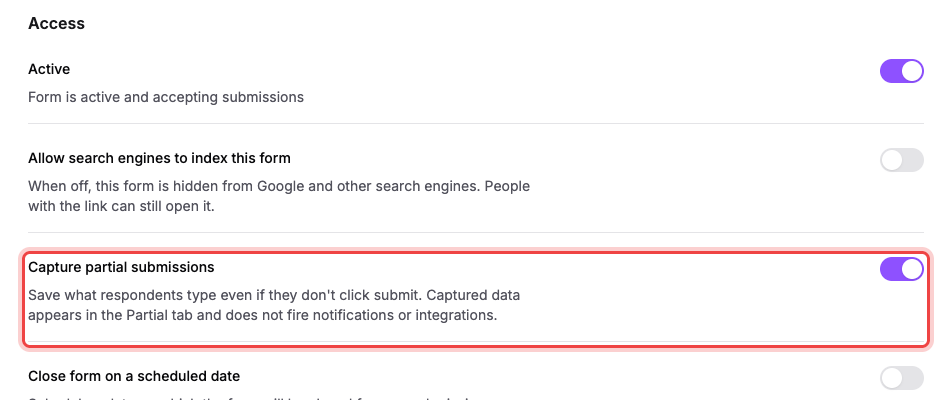
The switch is off on every new form, and you turn it on per form: enabling it on one form doesn't enable it everywhere.
What gets saved, and when#
Answers are saved about a second and a half after someone stops typing, and again whenever they change an answer. Nobody has to press anything and nothing appears on the form. As far as your respondent is concerned, nothing happened.
Maxforms keeps the answers to your text, long-text, email, phone, link, number, date, time, choice, and currency questions, plus which question the person reached before they stopped. It deliberately does not keep File Upload, Signature, or Address answers, and it never keeps card or payment details.
Capture only works on a form that's published and accepting responses, and only for questions that are visible to that person: an answer to a question your conditional logic is currently hiding isn't stored.
Read them in the Partial tab#
Open the Submissions tab and select Partial. Each row is one person who started your form, with a column for each question they could have answered, plus Last activity and Started.
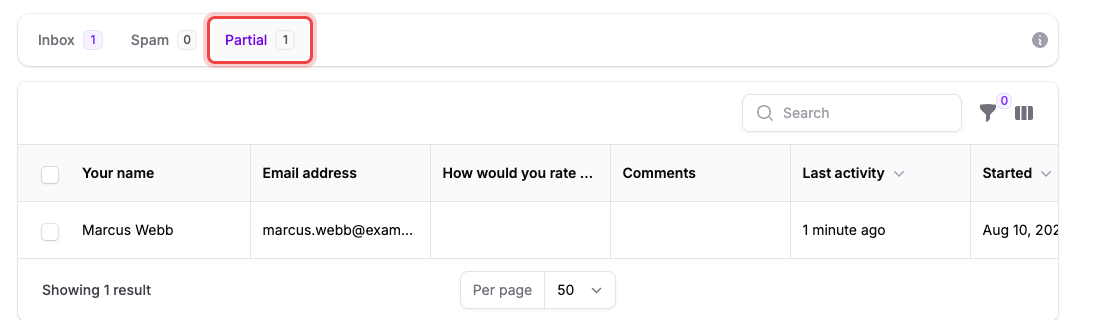
Use the search box to find a partial by its content, and the filter and column controls to shape the table the same way you do in the Inbox. Select View from a row's Actions menu to open it, Copy link to grab its address without opening it, or Delete; tick several rows and use Delete selected to remove them together.
Open a partial submission#
Select View to open it. The panel shows Started, Last activity, the Last field the respondent reached, and every answer captured before they stopped.
Copy link puts the same address on your clipboard, whether you take it from the row's Actions menu or from inside the open panel. See Share a link to a submission for who can open it and where a link lands.
When a partial becomes a real submission#
The moment that person presses Submit, their answers land in the Inbox as a normal submission and their partial row disappears. You never get both: a partial only exists while the response is unfinished, so the number on the Partial tab is a live count of people who are still stuck or already gone.
Someone who comes back to your form on the same browser picks up where they left off, with their earlier answers already filled in.
Partials don't trigger anything#
A partial submission is a private record for you. It doesn't send you the new-submission email, doesn't run any of your integrations, doesn't post to Slack or a webhook, and doesn't count toward your plan's monthly response limit. Nothing happens on your respondent's side either: following up with them is your call.
If the Partial tab is empty#
Check the three things capture needs, in this order:
- Your plan. Partial capture is a Pro feature. On the Free plan the Partial tab is there but stays empty, and the Capture partial submissions switch in Settings can't be turned on.
- The switch. It's off by default on every form, including forms you created before you upgraded.
- The form is live. Answers are only captured on a published form that's still accepting responses: a draft or a closed form captures nothing.
If a partial you saw yesterday is gone#
Partials are kept for 30 days from the last time that person typed something, then deleted automatically. That window is deliberate: an abandoned response is a follow-up opportunity, not a permanent record. If you need to keep one, copy the answers out before it ages out: partials don't go to the Trash and can't be recovered afterwards.