Use session credits when customers choose different appointment times during a Stripe subscription. The first appointment selected during checkout spends the first credit.
Your workspace needs Services access before you use this setup.
- Add a required Email field.
- Add Appointment Booking.
- Set its availability.
- In the Policies tab, choose Session credits under Booking type.
- Choose the required email field under Customer email.
- Set the billing cycle.
- Set Booking credits per cycle.
- Set Max unused credits to roll over.
- Select Save changes after editing each field.
- Publish the form.
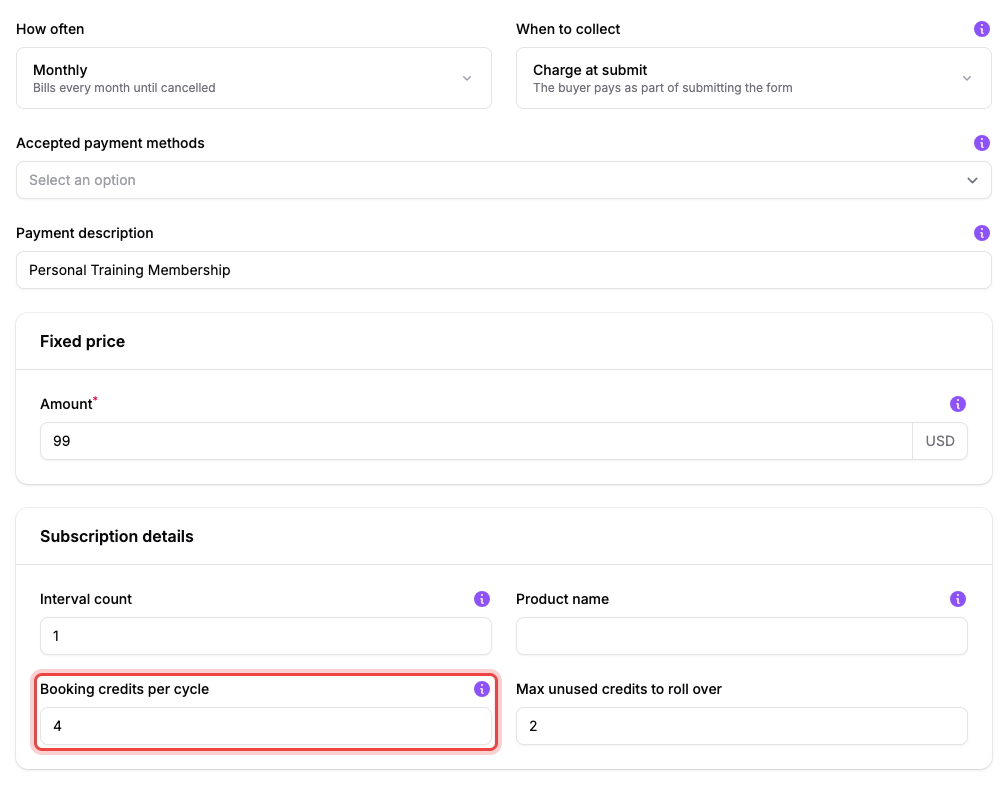
This example charges 99 USD monthly, grants four credits, and carries at most two unused credits into the next cycle.
For four monthly sessions, set four credits and monthly billing. Checkout grants four credits and immediately spends one on the chosen first session, so the opening balance is three.
At later paid renewals, the new balance equals the cycle grant plus unused credits up to your rollover cap. A cap of zero discards every unused credit.
With three unused credits and a rollover cap of two, the next paid month starts with six credits: four new plus two carried forward.
Customers can book a session in the portal while the subscription is active and has a positive balance.
If the customer has no credit, then wait or adjust the balance#
The next paid renewal can grant the new cycle's credits. A permitted team member can also make a documented correction with Manage session credits.